


Amazon Kindle: Reading App
4.8178.77K Reviews
App Specs
- Version
- Varies with Device
- Updated On
- License
- Free
- Downloads
- 100,000,000+
- Developer
- Amazon Mobile LLC
- Categories
- Books & Reference
- Platform
- Android, iOS
Screenshots
 Analysis by AppCompare
I often recommend Kindle to people who want to read on a phone or tablet without carrying a separate e-reader everywhere. The app is useful, but its smoothest experience depends on a few practical details: signing in to the right Amazon account, finding the books you actually want, and knowing what to check when something does not appear as expected. I find it works best when I treat it as one part of a reading routine rather than a magic fix for every book-access problem.
Where readers can get stuck
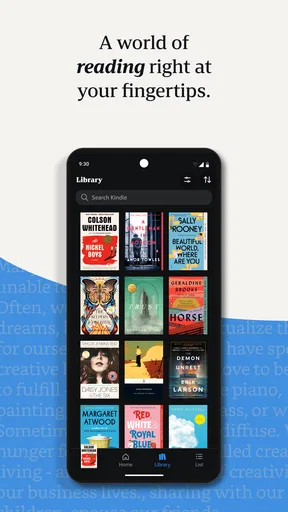
The first confusing point for some new readers is the difference between browsing a library and having a book ready to read. A title may be visible in your Kindle library without already being downloaded for offline use. If I know I will be without reliable internet, I open the book while connected and make sure it is available on the device before leaving. That small check is more useful than discovering the issue halfway through a trip.
Another common source of friction is account choice. If a book you expected is missing, I first check whether I am signed in with the same Amazon account used to acquire it. Families or people with more than one account can easily end up looking at the wrong library. I also give the library a moment to update after signing in or making a purchase, rather than tapping repeatedly and assuming the app has failed.
Guides and Analysis on Amazon Kindle: Reading App
It helps to separate a book’s availability from the app’s reading controls. Changing font size or page appearance can make a book more comfortable, but those options do not solve a missing-title problem. I check the library and account first, then adjust the reading view once I have opened the correct book. That order keeps troubleshooting simple.
Setup checks that save time
Kindle is a free Books & Reference app from Amazon Mobile LLC, and it is rated for Teen readers. Before settling in, I sign in, look through the library, and open a book while online. If I plan to use notes or highlights, I test those on a passage I can find again. It is a low-effort way to learn the controls before I need them for study or a book-club discussion.
The app has an average rating of 4.8 from around 4.5 million ratings, and it has been installed over 100 million times. Those figures suggest that it is a familiar option for many readers, but they do not guarantee that every title, device, or account setup will behave exactly as I expect. Kindle is free to install, while in-app purchases range from $1.99 to $11.99 per item; I check the price and terms of a book or reading offer before committing, especially when comparing a single purchase with a subscription.
A practical reading workflow
My most dependable routine is simple: choose a book while connected, download it before I need it, then open it once to confirm that it is ready. If I am switching between a Kindle device and the app, I let the current reading position sync before moving on. When a page or note seems out of date, I check the other device and give syncing a chance to catch up rather than making duplicate notes in a hurry.
Worth Reading Before You Choose

ESPN’s Live Game View Makes Following Close Games Easier

QuizzLand Review: A Good Fit for Short Trivia Breaks, Not Every Player

Basketball Stars: Multiplayer Is Fast, but Can It Recover When Matches Go Wrong?

WEBTOON Turns Phone Updates Into a Better Reading Routine

Link to Windows Runs on Shared Habits, Not Social Feeds

How Alibaba.com Dominates the B2B Marketplace
For a realistic day, I might read a few pages on a tablet at breakfast, continue on my phone during a commute, and return to the tablet at home. That flexibility is handy, but I do not assume every change is instant. A quick check of the last page and recent highlights before starting again helps me avoid rereading or losing track of a thought. For school or research, I also keep notes focused: highlights are useful for marking passages, while a separate study document may be better for organizing an argument across several books.
When the app is not the cause
If a title will not open or a download seems stalled, I first check the basics: internet access, the signed-in account, and whether the book is already available on the device. I avoid deleting a download as my first move if I am offline or unsure I can retrieve it again. For a reading position that looks wrong, I compare the app with the device where I last read and allow time for syncing. These checks cannot fix every problem, but they help distinguish a temporary connection or account mismatch from a reading-control issue.
Kindle also is not automatically the best choice for every kind of reading. If I want to browse a broad range of independent ebooks across different shops, a retailer-neutral reading app may fit better. If I mainly read print books, value a dedicated e-reader’s screen, or prefer borrowing through a local library’s own service, that alternative may suit me more. Kindle makes the most sense when the titles I want are available in its ecosystem and I value carrying a digital library on devices I already use.
For readers who prefer paper, the phone’s screen can still feel tiring during long sessions, even with adjustable text and appearance. I would not choose the app on the assumption that customization makes every screen comfortable for everyone. It is a good way to keep reading while travelling or waiting, but a dedicated reading device or a physical book may be a better fit for extended, focused sessions.
Reading that fits real life
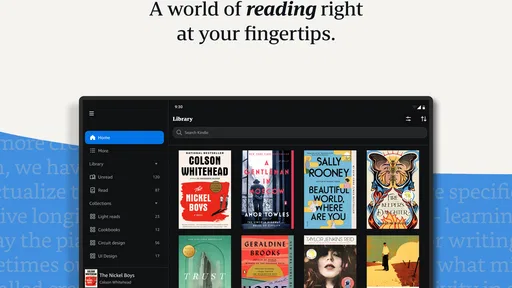
Hey there, fellow book lovers! If you're like me and can't resist diving into a good read, then you might want to check out Amazon Kindle. It's like having an entire library right in your pocket. I’ve spent some quality time with this app, and I’m here to spill the tea on why it might just be your new favorite reading buddy.
All About Access
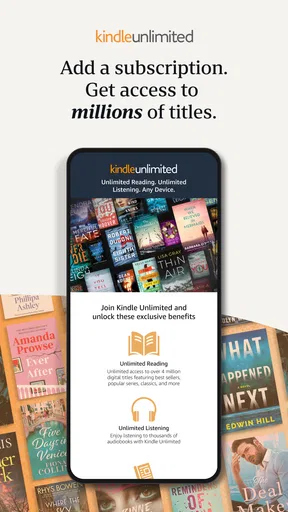
First off, let's talk about access. With Amazon Kindle, you've got access to thousands of books, magazines, and newspapers. Whether you're into the latest fiction thriller or a deep dive into history, it's all just a tap away. The app is super easy to navigate, and you can find whatever you're looking for in no time. Plus, the Kindle Unlimited feature is a game-changer if you're a voracious reader like me. For a monthly fee, you can read to your heart’s content.
Personalized Experience
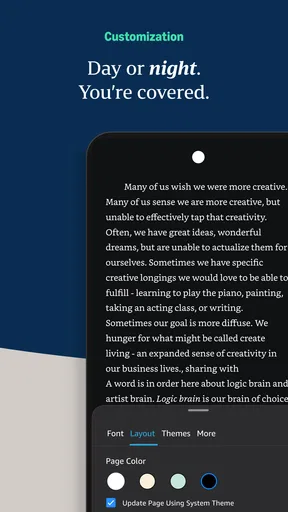
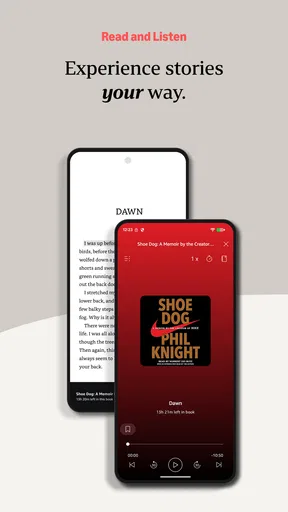
One thing I really love about the Kindle app is how customizable it is. You can adjust the font size, change the background color, and even tweak the brightness to suit your reading preferences. It's perfect for those late-night reading sessions when you don't want to disturb your partner. And if you're someone who loves to highlight and take notes, Kindle’s got you covered with those features too. Everything is synced across devices, so you’ll never lose your place or your notes.
Seamless Integration
If you're already an Amazon user, the integration is seamless. You can purchase books with a single click and they appear instantly in your library. It’s like magic! And speaking of magic, the Whispersync feature is pretty cool too. It lets you switch between reading on your Kindle device and the app without losing your spot. So convenient!
Offline Reading
Another perk? Offline reading. Download your books when you have an internet connection, and you’re good to go for those long flights or when you’re off the grid. No more worrying about losing your connection mid-chapter.
Social and Community Features
Feeling social? Kindle’s got features for that too. You can share your favorite passages on social media or see what your friends are reading. There’s a bit of a community vibe going on, which is a nice touch if you want to connect over your latest read.
Who I’d recommend it to
I would point a frequent Amazon book buyer toward Kindle first, especially if they read in short stretches across the day. Its strongest practical advantage is continuity: the same book can follow you from a dedicated Kindle device to a phone or tablet, so a spare ten minutes does not have to go unused. It also suits readers who want to change text size or page appearance without buying a different edition or carrying reading glasses as their only comfort adjustment.
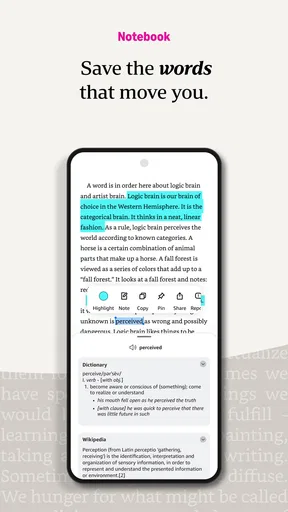
For students and nonfiction readers, the useful habit is to treat highlights as breadcrumbs rather than as a complete filing system. I mark the passage, add a short note when the reason matters, and later revisit the book instead of assuming every highlight will make sense out of context. If I am comparing several sources, I keep my own outline separately; the reading app is convenient for collecting moments, but a dedicated writing tool is usually better for shaping them into an argument.
Choosing between Kindle and other ways to read
Compared with a general ebook app that is designed to work across several retailers, Kindle is more compelling when the reader already buys or manages books through Amazon. That focus can make the library feel straightforward, but it also means I would check where a desired title is sold before building my whole digital collection around one service. A retailer-neutral app is a better fit for someone who routinely buys ebooks from different stores and wants one reading place for them.
Compared with paper, Kindle wins on portability, adjustable text, and carrying several books at once; paper wins if the feel of a physical page is part of the pleasure or if screen reading quickly tires your eyes. Compared with a dedicated e-reader, the phone app is easier to keep close at hand, while the separate device may be more comfortable when I plan to read for hours. I see these as different tools, not a contest with one universal winner.
Small habits that make the experience better
I recommend choosing the display settings at the start of a session instead of repeatedly changing them while reading. A comfortable text size and background make it easier to settle in, and a quick brightness adjustment can help when moving from a bright room to a dim one. If I am reading late, I also keep the screen at a level that feels comfortable rather than assuming a darker background alone will prevent eye strain.
When I want to revisit an idea, I make highlights selective. Marking every other paragraph leaves me with a crowded set of passages that are hard to use later. A few carefully chosen lines, paired with a brief note about why they matter, are more helpful for a book discussion or a class review. And before travelling, I do not just rely on seeing a title in the library: I open it while online and confirm that the download is ready.
What to expect from access and spending
Kindle is free to install, but that does not mean every book or reading option is free. Individual purchases and in-app offers can involve charges, so I read the price shown before confirming anything. Kindle Unlimited is a separate paid reading option mentioned in the app’s experience; I would compare its terms with the books I actually plan to read instead of subscribing just because a large catalogue sounds appealing. For occasional readers, buying only the titles they want may be easier to control.
The app has been around since June 28, 2010, and its Teen age rating makes it a familiar reading option for many older children and adults, though a rating is not a substitute for checking whether a particular book is suitable for a reader. Amazon Mobile LLC develops it. I find those details useful context, but the decision still comes down to the titles, screen comfort, and reading habits that matter to you.
My practical verdict
In a nutshell, if you’re looking for a flexible, user-friendly app to fuel your reading addiction, Amazon Kindle is worth checking out. It’s convenient, comprehensive, and frankly, kind of addictive. Happy reading!
My recommendation is strongest for someone who already has books in Amazon’s ecosystem, wants a quick way to read on a device they carry, and is willing to check downloads before going offline. I would hesitate if your priority is retailer independence, long screen-free reading sessions, or keeping costs predictable without checking individual purchase terms. For most readers in between, the app is an easy place to start: try it with a book you already own or one you genuinely want, adjust the reading view, and see whether the routine feels natural before making it the centre of your library.
Pros
- Extensive eBook library available.
- Syncs across multiple devices seamlessly.
- Adjustable text size and background.
- Built-in dictionary for easy lookup.
- Offline reading mode supported.
Cons
- Limited file format support.
- Requires Amazon account to use.
- Some titles can be pricey.
- No color screen for illustrations.
- Occasional app crashes reported.
FAQs for Amazon Kindle: Reading App
What devices are compatible with the Amazon Kindle app?
The Amazon Kindle app is compatible with a wide range of devices, including Android and iOS smartphones and tablets. It also works on Windows and Mac computers. This flexibility allows users to access their Kindle library from nearly any device, ensuring that your reading experience can be seamlessly continued across platforms.
Do I need a Kindle device to use the Amazon Kindle app?
No, you don’t need a Kindle device to use the Amazon Kindle app. The app is designed to provide the Kindle reading experience on any compatible device, such as a smartphone, tablet, or computer. This means you can enjoy your Kindle books without investing in a separate Kindle device.
Are there any costs associated with using the Amazon Kindle app?
Downloading the Amazon Kindle app is free, but purchasing books, magazines, or other content may incur costs. Kindle Unlimited offers a subscription service for unlimited reading from a selection of titles. While the app itself doesn’t require a fee, content purchases and subscriptions may require payment.
Can I read non-Kindle books on the Amazon Kindle app?
Yes, the Amazon Kindle app supports various file formats, including PDFs and some ePub formats. However, compatibility may vary, and some non-Kindle books might require conversion. Tools like Calibre can help convert files to Kindle-compatible formats, allowing you to expand your reading library beyond Amazon’s offerings.
How does the Amazon Kindle app enhance the reading experience?
The Amazon Kindle app offers features like adjustable text size, background color options, and a built-in dictionary to enhance readability. It also syncs your books across devices, allowing bookmarks, notes, and highlights to be accessed anywhere. These features combine to create a personalized and convenient reading environment.


